Does DayRunner replace my booking system?
No. It reads tomorrow's bookings from them and does the planning after the sale. Your booking system stays where it is.
How it works
DayRunner reads tomorrow from your booking system, plans the drivers, vehicles and pickups, drafts every message, and shows you only the things that need a decision. You approve. Then it sends.
DayRunner reads tomorrow's departures and bookings from Rezdy, FareHarbor or Rental Car Manager. On anything else, export a CSV or use a spreadsheet. Guests, pax, pickup points and notes come across with each booking.
It puts a driver and vehicle on every run. It checks licence class and P endorsement, seats against pax, each driver's hours and work time for the day, who's rostered and who's free, and which vehicles are out of service. Pickups are put in your stop order with times.
Anything it can't solve lands in one list called Decide before the day. A run with no vehicle. A driver over their hours. A guest with no contact details. Each one comes with options, like hire a van for the afternoon or split into two runs. Pick one and move on.
Guest pickup messages go out in your voice by WhatsApp, SMS or email. Supplier reconfirmations go from your own Gmail, with the numbers and dietary notes for the day. Drivers get their brief. Read them, change what you like, approve. Or copy and send them yourself.
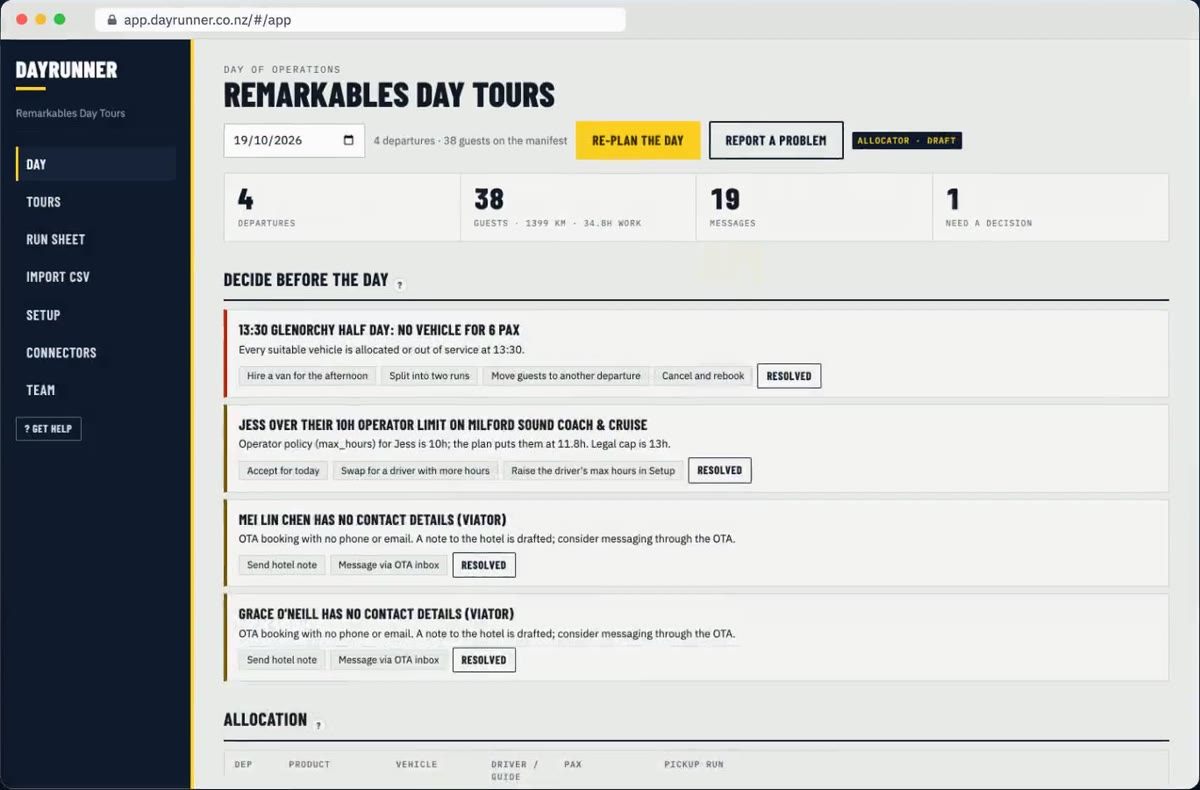
The Day page has everything for tomorrow on one screen: departures, guests, messages drafted, and how many things need a decision. Below that sits the allocation board with every run, its vehicle, driver and pickup order.
Change anything by hand and DayRunner re-plans around it. Lock a run and it stays put.
Every guest message, supplier email and driver brief is a draft until you approve it. Approve one at a time or all at once. Hold any you're not sure about. Every send is logged.
Bókun, Checkfront and Peek on request.
| The job, every operating day | By hand | With DayRunner |
|---|---|---|
| Pull tomorrow's bookings into a sheet | 15 min | 0, it syncs |
| Allocate drivers and vans, check licences, hours, who's free | 30 to 45 min | 5 min review |
| Pickup order and times | 15 min | 0 |
| Guest pickup messages | 30 to 50 min | 5 min approve |
| Supplier reconfirmations | 20 to 30 min | 3 min approve |
| Chasing supplier replies next morning | 10 to 20 min | 0, replies matched |
| Driver briefs | 10 to 15 min | 2 min |
| Driver hours and mileage log | 10 min | 0 |
| Total, per day (estimate) | 2h 20m to 3h 20m | About 15 min |
Send us your fleet list and last week's bookings. We'll have tomorrow planned within 24 hours. One call to check it's right, then a direct line to us while you get going.
No. It reads tomorrow's bookings from them and does the planning after the sale. Your booking system stays where it is.
Yes. It counts each driver's work time for the day, including the pickup run, and flags anyone the plan would put over their limit under the Land Transport Rule: Work Time and Logbooks 2007, or over the maximum hours you set. It tells you which rule and gives you options.
For you, about an hour. Send us your fleet list and last week's bookings and we do the rest. Tomorrow is planned within 24 hours.
Show us tomorrow in your booking system. We'll show you the same day in DayRunner.